Employee Attendance Management Software for Handling Missed Punches and Record Corrections
Introduction
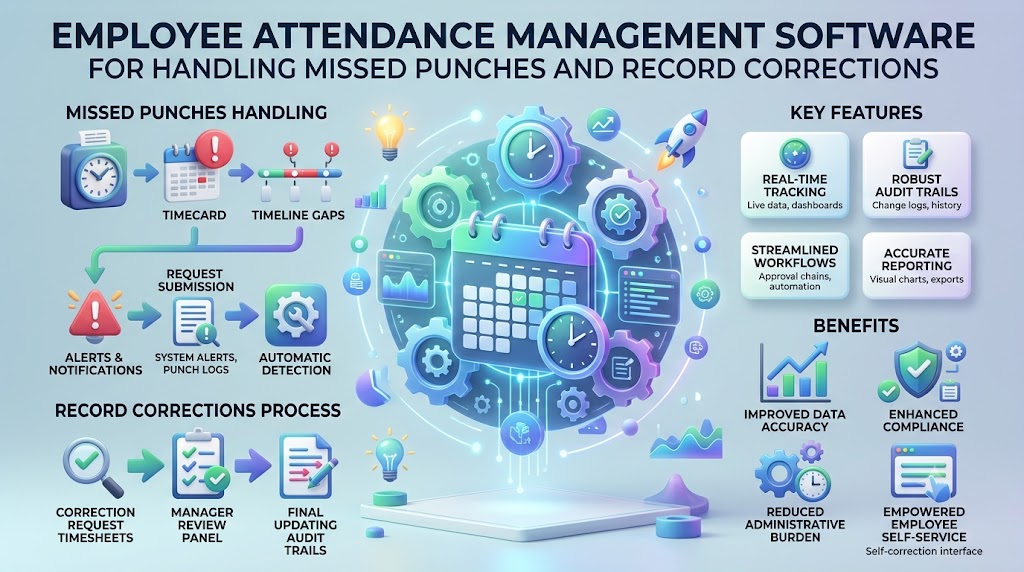
A missed check-out can create questions at the end of a workday. An employee may forget to record it. A browser issue may interrupt the process. Sometimes, a manager simply needs more details before reviewing the record.
These small gaps can become harder to manage when records stay scattered. HR teams may search messages, compare spreadsheets, and ask employees for explanations. Employee Attendance Management Software gives businesses a clearer way to review these situations.
InOrOff is a cloud-based employee attendance and leave management platform. It helps small and growing businesses organise workforce records. Teams can review attendance, manage corrections, and keep leave information together. This makes everyday recordkeeping easier to follow.
What Are Missed Punches and Attendance Corrections?
A missed punch happens when an employee fails to record a required attendance event. This could be a missing check-in or check-out. It may also happen when a break entry is missing.
An attendance correction is a reviewed change to an existing record. For example, an employee may report a forgotten check-out. A manager can review the explanation and decide whether a correction is appropriate.
These situations need a consistent process. A missing entry should not automatically be treated as misconduct. It should also not be changed without a suitable review.
Businesses should explain how employees can report mistakes. They should define who reviews correction requests. Clear records help everyone understand what happened and how the issue was handled.
Why Attendance Errors Need Careful Review
Attendance records can affect several workplace tasks. Managers may use them to review schedules and working hours. HR may prepare monthly summaries from the same information.
An incorrect entry can create unnecessary questions. A missing check-out may make a workday appear incomplete. An incorrect date may place an entry under the wrong day.
Manual correction methods can make these problems harder to trace. Someone may change a spreadsheet without explaining why. Another person may continue using an older version.
A clear review process helps prevent this confusion. Employees can report the issue with relevant details. Managers can review the available information before approving a change.
Employee Attendance Management Software can support this process. It helps keep attendance records in one place. However, people must still check unusual entries and follow company policy.
Employee Attendance Management Software for Reliable Records
Employee Attendance Management Software helps businesses collect and review attendance information. Depending on the platform, it may record check-ins, check-outs, breaks, and working hours.
A useful system should make incomplete entries easy to find. Managers should be able to identify records that need attention. Employees should know how to report a mistake.
The correction process matters just as much as the original entry. A manager should understand what changed and why. The business should also control who can make changes.
InOrOff offers central attendance tracking for small and growing teams. Managers can review attendance records and handle corrections. This can reduce dependence on separate spreadsheets and message histories.
Businesses should test the correction process before using it regularly. Employees need simple instructions. Managers need clear responsibilities.
Employee Check In Check Out Software for Missing Events
Employee Check In Check Out Software records the start and end of a workday. Some platforms allow employees to complete these actions through a web browser.
A missing event can happen for several reasons. An employee may forget to check out. A connection may fail during the process. A device issue may also interrupt attendance recording.
Server-verified timestamps use the server's recorded time for an event. This helps reduce differences caused by incorrect device clocks. However, timestamps alone cannot explain why an entry is missing.
Businesses should provide a simple reporting process. Employees can identify the date and missing event. Managers can then review the details before making a correction.
InOrOff supports browser-based check-ins and check-outs with server-verified timestamps. This gives teams a central place to record and review attendance activity.
Employee Leave Management Software and Absence Records
Employee Leave Management Software helps businesses organise leave requests and approved absences. It can keep leave types, holiday calendars, and request decisions together.
Leave records can help explain attendance gaps. An employee with approved leave may not have a normal check-in that day. HR should check the relevant leave record before treating the entry as an unexplained absence.
The system should make request status clear. Pending leave is different from approved leave. Employees and managers should be able to understand that difference.
InOrOff brings leave management and attendance records into one platform. This helps teams review related information without searching several files.
Businesses should keep their leave policies clear. Software settings should reflect approved company rules. HR should review unusual cases rather than relying on assumptions.
Attendance and Leave Management System for Record Checks
An Attendance and Leave Management System connects attendance information with leave records. This helps managers understand the context behind unusual entries.
Suppose an employee has no attendance record on a particular day. The manager can check whether approved leave explains the absence. If not, the employee may need to provide more information.
Connected records also help during monthly reviews. HR can compare attendance entries with scheduled work and approved leave. This makes inconsistencies easier to identify.
A shared system does not remove the need for human judgement. Some cases require a conversation with the employee. Others may need a technical check.
InOrOff helps businesses manage attendance and leave through a central platform. Teams can review relevant records before making changes.
Leave Approval Workflow Software for Clear Review Steps
Leave Approval Workflow Software organises how leave requests move from submission to decision. A workflow is a series of steps used to complete a task.
The employee submits a request. The assigned manager reviews the dates and applicable company policy. The manager then records the decision.
A clear process reduces confusion about responsibility. Employees know where to submit requests. Managers know which items need their attention.
The same principle applies to attendance corrections. Businesses should define who can review a reported error. They should also explain how employees can ask about a disputed record.
InOrOff provides a central dashboard for leave approvals and attendance corrections. This can help managers keep routine decisions organised.
PTO Tracking Software and Correct Leave Balances
PTO Tracking Software helps businesses organise paid time off. PTO means paid time away from work under the applicable company policy.
Leave balances may depend on several settings. Accrual means earning leave over time. Carry-forward means moving unused leave into a later period when allowed.
Half-day leave and holiday exclusions can also affect calculations. A half-day request covers part of a working day. A holiday exclusion determines whether a holiday counts within a leave period.
Incorrect settings can lead to confusing balances. HR should check the relevant policy and system configuration. Employees should have a clear way to report unusual results.
InOrOff supports relevant PTO settings, including accrual, carry-forward, half-day leave, and holiday exclusions. Businesses should configure these features according to their approved policies.
Employee Leave Balance Tracker for Checking Discrepancies
An Employee Leave Balance Tracker helps staff review their leave position. It may show available leave, used leave, pending requests, and approved future absences.
A discrepancy means that two records do not appear to match. For example, an employee may believe a request was approved, while the system shows it as pending.
The first step is to check the request details. HR can review the recorded decision and relevant policy settings. If a mistake exists, the business can follow its correction process.
An Employee Leave Balance Tracker can make these questions easier to investigate. It cannot guarantee that every record is correct. Regular reviews remain important.
InOrOff provides a leave balance view for relevant employee records. This helps staff and managers check available and upcoming leave information.
Time and Attendance Software for Small Business: Review Features
Time and Attendance Software for Small Business should make record reviews straightforward. Small teams may not have staff dedicated to attendance administration.
Look for features that solve common problems:
Clear error visibility: Managers should find incomplete entries quickly.
Simple correction requests: Employees should understand how to report mistakes.
Review permissions: Only authorised people should change records.
Useful reports: HR should be able to review attendance for a chosen period.
Connected leave records: Approved absences should be easy to check.
Accessible instructions: Employees should understand the attendance process.
Clear data handling: Businesses should know how records are stored and accessed.
Time and Attendance Software for Small Business should also fit the workplace. Office teams, remote staff, and mixed teams may have different access needs.
InOrOff offers attendance and leave features for small and growing businesses. Teams should review the available functions before deciding whether they fit their process.
Office IP Attendance System and Access Problems
An Office IP Attendance System can limit check-ins to approved office networks. An IP address identifies a network connection. The system checks whether that connection matches the allowed settings.
This approach may suit businesses that expect attendance recording from their offices. However, network changes can affect access. Employees may need help when an approved connection stops working.
An Office IP Attendance System is not foolproof. It should not replace a clear process for reporting technical issues. Businesses should explain what employees should do when check-ins fail.
This option can avoid biometric devices. It also does not require continuous location tracking. Privacy and access needs should still be reviewed.
InOrOff offers an optional office IP attendance feature. Businesses can decide whether it suits their workplace and network setup.
Payroll Ready Attendance Software for Reviewed Reports
Payroll Ready Attendance Software helps prepare attendance information for an external payroll process. It does not mean the attendance platform runs payroll itself.
Before exporting a monthly report, HR should review incomplete entries. Approved corrections should be reflected in the report. Relevant absence records should also be checked.
CSV files can be opened in spreadsheet applications. PDF files provide a document for reading and sharing. The receiving payroll provider may have specific format requirements.
Businesses should confirm those requirements before sending files. They should also keep track of the report version that was reviewed.
InOrOff supports monthly attendance summaries and versioned CSV and PDF exports. These files can support external payroll processing. InOrOff does not run payroll or guarantee payroll accuracy.
The business remains responsible for reviewing its records. It should also check local labour rules and company policy.
Common Attendance Correction Mistakes
1. Changing entries without checking the details
Review the employee's explanation before approving a change.
2. Treating every missed punch as intentional
Ask for context before drawing conclusions.
3. Leaving correction requests unanswered
Set a clear process for reviewing reported issues.
4. Allowing uncontrolled record changes
Limit editing access to authorised staff.
5. Ignoring approved leave
Check absence records before investigating missing attendance.
6. Forgetting to document decisions
Keep a clear record of approved corrections.
7. Using outdated spreadsheets
Make sure staff know which record is current.
8. Exporting reports too early
Review incomplete entries before preparing monthly files.
9. Failing to explain the correction process
Tell employees how to report mistakes and check outcomes.
10. Ignoring repeated technical issues
Look for patterns that may need changes to the attendance process.
A Simple Example: Correcting Attendance Records
Fictional example
Imagine a small consulting team that reviews attendance at the end of each month. Several employees have missing check-out times. The manager spends time asking questions and updating a spreadsheet.
The business introduces InOrOff.com to organise attendance and leave records. Employees receive clear instructions for reporting missed events. Managers review correction requests through the available process.
One employee reports a forgotten check-out. The manager checks the details and follows the company's correction procedure. HR then reviews the updated record before preparing the monthly summary.
The new process gives the team a clearer way to handle missing entries. It does not remove the need for careful review. Employees and managers still need to follow the same rules.
How InOrOff Can Help
InOrOff provides a cloud-based employee attendance and leave management platform for small and growing businesses. It helps teams organise daily attendance and absence records.
Employees can record attendance through the supported browser process. Server-verified timestamps help keep event times consistent. Managers can review attendance corrections through a central dashboard.
The platform also supports leave requests, PTO settings, and a leave balance view. An optional office IP feature can restrict check-ins to approved networks. Monthly summaries and versioned CSV and PDF exports can support external payroll processing.
InOrOff does not run payroll. Businesses should review its current features, security information, and subscription terms before choosing it. They should also keep clear procedures for reporting and correcting errors.
Frequently Asked Questions About Attendance Corrections
1. What should an employee do after missing a check-out?
The employee should report the missing entry through the company's approved process. They should provide the relevant date and explain what happened. The manager can review the details before making a correction. The business should keep the process consistent across employees.
2. Can Employee Attendance Management Software prevent every attendance mistake?
Employee Attendance Management Software can help organise records and identify incomplete entries when suitable features are available. It cannot prevent every forgotten punch or technical issue. Businesses still need clear instructions, regular reviews, and a fair correction process.
3. How does Employee Check In Check Out Software record attendance times?
Employee Check In Check Out Software records the relevant check-in and check-out events. Some systems use browser-based access and server-verified timestamps. The exact process depends on the platform. Employees should know how to report failed attempts or missing records.
4. Why should Employee Leave Management Software be connected with attendance records?
Employee Leave Management Software helps HR check approved absences when reviewing attendance. This provides context for days without normal check-ins. It can reduce unnecessary investigations. Businesses should ensure that leave decisions are recorded correctly and remain easy to review.
5. What is the benefit of an Attendance and Leave Management System?
An Attendance and Leave Management System keeps related attendance and leave information together. Managers can review absence records before investigating unusual entries. HR can also prepare more organised summaries. Human review remains necessary when information is missing or disputed.
6. How can Leave Approval Workflow Software help with disputed requests?
Leave Approval Workflow Software keeps request status and decisions organised. Employees and managers can review the recorded outcome. If details appear incorrect, the business can follow its process for checking the request. Clear responsibilities help avoid confusion.
7. Can PTO Tracking Software correct an incorrect leave balance automatically?
PTO Tracking Software may update balances based on configured rules and recorded leave. However, incorrect source records or settings can still affect the result. HR should investigate unusual balances before making changes. Businesses should verify their policy settings and request history.
8. What can an Employee Leave Balance Tracker help employees check?
An Employee Leave Balance Tracker may show available leave, used days, pending requests, and upcoming approved absences. Employees can use these details to identify possible discrepancies. If the information seems wrong, they should contact the appropriate manager or HR representative.
9. Is an Office IP Attendance System useful when employees face connection problems?
An Office IP Attendance System can restrict attendance actions to approved networks, but connection issues may prevent access. Businesses should explain how employees can report these problems. They should also provide a suitable review process rather than assuming every missed entry reflects employee behaviour.
10. Does InOrOff provide Payroll Ready Attendance Software for salary processing?
InOrOff provides attendance summaries and CSV and PDF exports that can support external payroll processing. It does not run payroll or guarantee payroll accuracy. Businesses should review their records before sharing files and confirm the required format with their outside payroll provider.
Final Thoughts
Attendance corrections need a clear and consistent process. Employees should know how to report missing entries. Managers should review the details before approving changes. HR should check records before preparing monthly summaries.
Digital attendance tools can make these tasks easier to organise. Choose a system that supports useful reports, clear permissions, and connected leave records. Review technical issues instead of relying on assumptions.
InOrOff can help small and growing businesses organise attendance and leave information. Its exports can support an external payroll process, but it does not run payroll. Keep company procedures clear and check your local labour rules and company policy before setting attendance practices.